Every health system has an EHR integration backlog. New lab interfaces queue behind directory migrations, patient portal feeds stall on security reviews, and the go-live date for a new specialty clinic slips because a single HL7 message mapping is stuck in a shared inbox. The standard response is to hire more integration engineers or buy a faster engine. But the real bottleneck is the process itself. To cut EHR integration backlog delays, forward-thinking IT leaders are using value stream mapping to trace handoffs, eliminate redundant steps, and accelerate go-live without adding headcount or middleware.
The Hidden Cost of Handoffs in the EHR Integration Queue
An integration ticket rarely moves from “submitted” to “live” in one clean path. It hops from a clinical analyst to a data-mapping specialist, over to a security architect, back to the interface engine admin, and then to the QA team. Each handoff adds a queue, and each queue adds wait time. By the time a task has passed through five hands, the value-add work may total only a few hours — while the elapsed time spans several weeks.
The Shadow Process Between Systems
Even when the project management tool shows a status, the actual handoff is often conversational. A Slack message, a forwarded email, a comment on a shared spreadsheet. These invisible workflows are where the backlog grows. Value stream mapping forces every step, wait, and transfer to be written down in one visible stream, including the “idle time” between steps. When health systems see this for the first time, the ratio is striking: often less than 10 percent of total lead time is actual value-added work.
Why Traditional Backlog Triage Fails
Most teams triage the backlog by priority score. It feels productive because the most important tickets move first. But the system remains clogged. The root issue isn’t which ticket to do next — it’s the structure of the flow itself. Priority triage optimizes a broken pipeline, while value stream mapping redesigns the pipeline.
How Value Stream Mapping Exposes the Real Bottlenecks
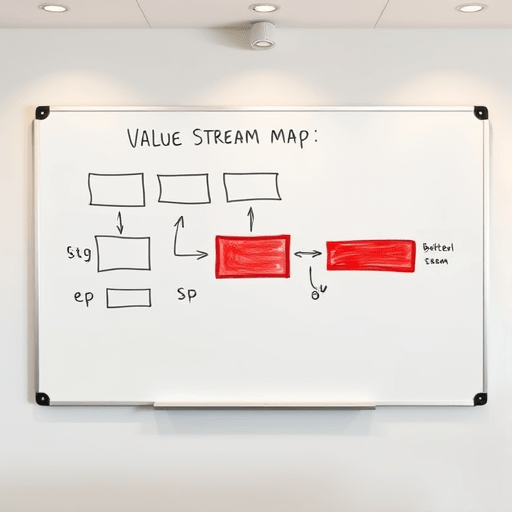
Value stream mapping, or VSM, comes from lean manufacturing. It is a pencil-and-paper technique that traces a specific integration request from the moment a clinical department submits it to the moment the interface is live and verified. The goal is to see the whole system, not just the parts. For an EHR integration queue, the map starts with the intake form and ends with the go-live checklist.
Symbols, Timelines, and the Ratio That Matters
A VSM uses a few simple symbols: a rectangle for a process step, a triangle for inventory or queue, and an arrow for flow. Above each step you record the cycle time, or the actual work duration. Below it, you record the wait time. At the bottom of the map, you draw a timeline that separates value-added time from non-value-added time. The sum of all value-added time divided by the total lead time gives you your process efficiency. Most integration teams are shocked to see a single-digit percentage. That percentage is the metric worth tracking, not the number of open tickets.
Eliminating Redundant Steps Without Breaking Clinical Workflows
Once the current-state map is on the wall, redundant steps become obvious. One common pattern is double data entry: the integration team asks the clinical analyst to hand-populate a test patient record in the staging environment, then the QA engineer creates the same record again from a different source. Another is redundant approval loops. A minor field-length change might require the same sign-off from an HIM director who hasn’t been involved since the original request. These steps add no clinical or technical value, yet they consume calendar time and create opportunities for errors.
The Handoff Matrix
A simple handoff matrix is a table listing every team involved in an integration request on both axes, with an “X” marking every transfer of work between teams. Health systems often discover that the same data is passed back and forth three or four times between the same two departments. The fix isn’t necessarily to remove all handoffs — some are required for safety and compliance. The fix is to reduce the number of times ownership changes and to clarify exactly what artifact is being transferred at each boundary.
Accelerating Go-Live with a Target-State Integration Stream
The second half of a VSM exercise is designing the target state. This is where the team imagines the integration flow as if it were new: no legacy assumptions, no inherited roles, no “this is how we’ve always done it.” The target state often reduces the number of steps by half and shortens lead time by more than 60 percent. For an EHR go-live, that means the new ambulatory center’s orders and results interfaces are ready two weeks earlier, and the ICU’s device connectivity is verified in parallel with, not after, the main build.
Parallelize the Sequential Handoffs
Many handoffs are sequential only because of departmental habit. The security review does not have to wait for the final message specification. It can run against a draft. The QA team can build a simulation harness while the mapping team is still working. By overlapping phases, the target-state map flattens the timeline. The integration work gets faster without anyone working overtime.
Kill the Rework Loops
Rework loops, such as a message that bounces back for field correction, are pure waste. The target state should include automated validation at the point of creation. If the interface engine can check required fields, data types, and vocabulary against a standard profile before the ticket moves to the next queue, the loop closes early. This is a proven way to eliminate redundant steps that exist only to fix avoidable errors.
A Practical 60-Day VSM Sprint for Integration Teams
Value stream mapping is not a one-time workshop; it’s a structured sprint. A focused 60-day sprint can take a team from baseline to measurable improvement without spinning up a massive project. Here is a realistic cadence.
Weeks 1–2: Define the Customer
Pick one integration type and one customer. It could be “the radiology department’s new AI-based stroke detection application” or “the patient portal’s onboarding feed.” The narrower the scope, the more honest the map. Gather a cross-functional team that includes the interface analyst, security reviewer, a clinician end-user, and the project coordinator. Review the past twenty tickets of this type and record actual dates: submitted, assigned, reviewed, approved, completed.
Weeks 3–4: Map the Current State with Data
Walk the process, not the documentation. Ask the people who actually touch the work, not just their supervisors. Document cycle times, wait times, and the percentage of complete and accurate forms. Do not yet propose any fixes. The goal is to see the real flow. On average, this mapping session reveals at least one hidden queue that the project management tool never showed.
Weeks 5–6: Identify Waste and Design Target State
Classify every observed step as value-added, necessary non-value-added, or pure waste. Eliminate the pure waste and reduce the necessary non-value-added work (such as compliance checkpoints) by batching or automating. Draft the target-state map. Set a stretch lead-time target, for example, 40 percent faster than the current baseline, and agree on the metrics you will track at the end of the sprint.
Weeks 7–8: Pilot, Measure, Scale
Run the new target state on a small set of integration requests. Measure the process efficiency percentage and the actual lead time. Compare to the baseline. If the improvements stick, expand the method to the next integration type. If the improvements stall, update the map — the bottleneck has simply moved somewhere else, and the VSM cycle can start again.
Conclusion
EHR integration backlogs are not a staffing problem; they are a flow problem. Value stream mapping gives a health system a shared picture of where time disappears, where handoffs add no value, and where a tiny automation can unlock a major delay. By tracing handoffs, eliminating redundant steps, and driving toward a leaner target state, integration teams can accelerate go-live and turn a growing queue into a predictable, manageable pipeline — without a single new tool or a single new hire.