Generating dozens of training videos, cheat sheets, and classroom slide decks is the easy part. The genuinely hard part of an EHR go-live arrives when a seasoned nurse opens an order entry screen that doesn’t match the way her team actually spends its morning. The most expensive mistake in any implementation is the decision to train staff before you map current-state workflows to EHR features. When training content resembles a system that no one uses, staff members don’t just lose patience — they lose trust. In 2026, with AI-drafted notes, ambient listening tools, and patient-requested prescription updates reshaping the clinical desktop, the workflow-first lesson is more urgent than ever.
Why Training Before Mapping Creates Unnecessary Resistance
Resistance to an EHR is rarely a personality flaw. It is a signal that the system feels foreign. If a training session teaches a “new” physician workflow that actually breaks a longstanding clinical habit, the learner immediately discounts the entire platform. The resistance is rational: the EHR appears illogical, unhelpful, and burdensome.
When training occurs before workflow mapping, the “current state” is whatever a project manager imagined in a spreadsheet. That false baseline becomes the blueprint for configuration, training scripts, and even go-live support. Staff members then discover that the EHR expects them to do things in an order that contradicts reality. They start building workarounds on day one, which entrenches resistance and undermines data quality.
A workflow-first approach inverts this. Instead of teaching people to conform to an unexamined system, you first learn exactly how work is getting done today — including the unofficial variations that keep departments alive. Then you map those workflows to EHR features, adjust the configuration, and only bring trainers into the picture. The result is a system that feels familiar even when it is new.
How to Build a Current-State Workflow Map That Holds Up
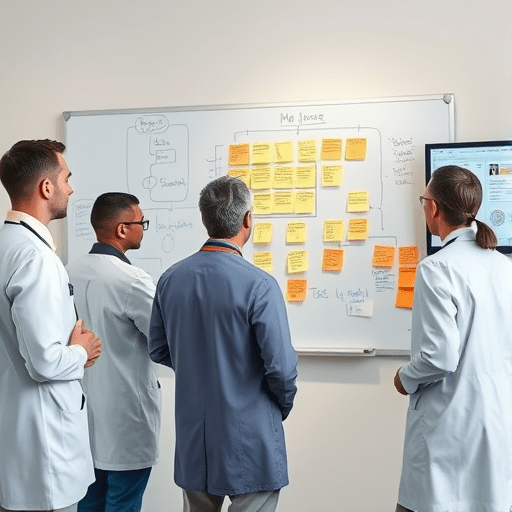
A useful current-state map is not a single flowchart printed on A3 paper. It is a living model of multidisciplinary work, collected from the people who actually perform it. To make this work in the current period, you need more than a few meetings in a conference room. You need observation, conversation, and a willingness to discover uncomfortable facts.
Shadow Real Shifts, Not Just “Typical Days”
Watching a clinic’s morning flow for two hours tells you more than five process mapping sessions. During shadowing, note what people type, where they pause, which screens they abandon, and why they pick up a phone instead of using a standard order set. A single nurse may handle the same task differently depending on the patient’s age, insurance, or language preference. Those variations are not noise — they are core requirements.
Run Workflow Walk-Downs With Handheld Raters
A walk-down is a structured event in which staff members physically trace a patient’s journey from check-in to follow-up. Provide each participant with a scoring rubric on a tablet or paper. Ask them to mark every step that involves an information exchange, such as vital signs entry, medication reconciliation, or handoff. If two staff members interpret the same step differently, that disagreement is an excellent launch point for mapping workflow gaps to specific EHR features.
Capture “Shadow Work” That Never Appears in the Chart
Many clinicians perform invisible work — reviewing lab results on a mobile phone, keeping a paper list of follow-up calls, or mentally tracking a pending order. In a current-state workflow map, this shadow work must be visible. If you ignore it, your EHR configuration will accidentally automate the visible steps while leaving the invisible ones to memory, spam folders, and sticky notes.
Mapping the Gaps to Specific EHR Features
Once you have a current-state map, the next task is to translate each work activity into an EHR feature or interaction. An intake phone call becomes a structured patient portal questionnaire; a verbal handoff becomes a standardized handoff note in the patient’s chart; a nurse’s whiteboard note becomes a task in the worklist. This is not about making the EHR mimic your old paper forms; it is about preserving the logic of your workflows inside the new digital tools.
For each mapped workflow, ask three questions:
- Is this critical workflow represented by an existing EHR feature? If yes, configure that feature to match the current-state steps. If no, you need a gap statement and a decision about whether to change the feature, change the workflow, or build a bridge using another tool.
- Is there a happy path that the EHR handles smoothly, and a messy path it does not? Workflows are rarely linear. Identify the messy paths — such as the patient who arrives without an appointment or the provider who gets interrupted three times — and map them to exception handling mechanisms.
- Does the EHR’s terminology match the staff’s language? A workflow that says “The nurse checks the allergy list” maps poorly if the patient’s own chart lists the same issue under “intolerance.” Do not underestimate the power of vocabulary in reducing resistance.
When you map current-state workflows to EHR features before training, you also discover configuration items that should never be left to default. Buttons that belong on the home screen, mandatory fields that should be optional, and note templates that should match a specialty’s typical dictation structure are all uncovered during this mapping exercise. Fixing them before training means learners never have to develop a workaround.
Reducing Resistance Through Shared Vocabulary
There is a subtle but powerful moment in a go-live when a nurse says, “Oh, the Message Center is just like our paper inbox, only everything stays in one place.” That moment arrives because trainers understand where the learner is coming from. But they can only do that if the current-state map was used to build training scripts, not just design screens.
Use the current-state map to create a simple translation table between familiar work terms and EHR locations. For example, “calling the lab for a stat result” becomes “checking the notifications tab and using the flag icon.” These translations are far more effective than generic EHR training because they respect the intelligence and experience of your staff. When learners recognize their own workflow in the new system, resistance usually softens into curiosity.
A Fresh Twist for the Current Phase of Health IT: Designing for Emergent Workflows
In many places, “current state” is no longer static. Small care teams are experimenting with AI scribes, patient portal messaging, and asynchronous order updates daily. When you map workflows, you may discover that some steps are already hybrid — a clinician signs in to the patient portal from home, or a nurse uses a voice assistant to enter a medication. The workflow before your EHR implementation is not necessarily a paper baseline; it may already include fragmented digital tools that need to be consolidated.
This means that a current-state map is not just a historical document. It should also capture emerging micro-workflows that have appeared because of ambient intelligence or patient-generated health data. If these are not mapped to EHR features before training, staff members will be torn between the familiar old system and the new EHR. Training then becomes the moment of conflict rather than the moment of unification.
The good news is that most modern EHR platforms are capable of supporting a huge range of workflows. The challenge is not lack of features; it is deciding which features are relevant to each role and how they map to everyday work. That decision is far easier while everyone is still in the current-state mindset, before you start teaching button clicks.
The Bottom Line for a Successful Go-Live
Refine the workflows first and you will have a training program that is not a slog but a revelation. Leave workflows as an afterthought and you will have a go-live defined by help desk tickets and hallway complaints. When staff members see that their real work patterns have been mapped to EHR features — that the system was built around them, not the other way around — they will treat the new EHR as an ally rather than an obstacle.
Map current-state workflows to EHR features before training staff. That single decision changes almost everything after it: documentation quality, user satisfaction, safety, and even the return on the project’s cost. It is the surest way to turn a go-live from a stressful event into a moment of shared achievement.
Workflow maps belong in every project plan, but they only matter when they are followed. As you prepare for the next phase of your EHR journey, let the map be your guide and your staff be your co-designers. The fewer surprises learners encounter, the more trust the system earns from day one — and the less resistance you will ever need to overcome.