Remote-first work has given us exceptional digital whiteboards, yet many teams still miss the cognitive boost of standing up, grabbing a marker, and sketching an idea in real space. The good news is that you don’t have to choose between async collaboration and physical ideation. With the right routine, you can use a physical whiteboard in a remote async team by building a dependable photo-sharing ritual for hand-drawn diagrams—one that turns a single office snapshot into a durable, searchable, and genuinely useful knowledge asset.
This isn’t about turning your whiteboard into a glorified camera roll. It’s about designing a repeatable practice that gives every teammate, in every time zone, the same context they would get if they were standing next to you in the room.
Why Hand-Drawn Diagrams Still Matter in an Async World
Digital tools have become incredibly good at simulating whiteboards, but they still miss something fundamental: the friction of drawing by hand slows your thinking in a productive way. When you sketch a system architecture or a user flow with a physical marker, you’re forced to simplify, to confront spatial relationships, and to make mistakes visible. That messiness is valuable. It sparks better questions and invites collaboration more naturally than a clean, pixel-perfect flowchart ever does.
For remote async teams, a physical whiteboard also offers a break from screen fatigue. It brings a tactile, human element back into distributed work. And when you photograph those diagrams and share them through a deliberate ritual, you preserve the spontaneity of a brainstorm without requiring everyone to be online at the same moment.
Setting Up a Whiteboard Station That’s Actually Photogenic
The biggest failure of whiteboard photos is illegibility. Glare, shadows, skewed angles, and faded markers all conspire to make your diagram unreadable. Before you think about sharing, invest a few minutes in creating a photo-friendly whiteboard station.
Lighting and Positioning
- Place the whiteboard perpendicular to any large windows to avoid direct sunlight washing out the image.
- Use an overhead LED light or a clip-on ring light mounted on the board frame to provide even, cool-white illumination.
- Mark a small tape square on the floor about three to four feet back from the board—this gives you a consistent spot for taking a straight-on photo every time.
Marker and Board Maintenance
- Use high-contrast markers: black, dark blue, or dark red for primary lines; bright orange or green for highlights. Avoid yellow and light pastels.
- Clean the board thoroughly after every session, but leave faint residue of complex diagrams if you plan to build on them later—this helps you align new additions.
- Invest in a dry-erase board with a glossy finish, which photographs better than matte surfaces and resists ghosting.
The Photo-Capture Setup
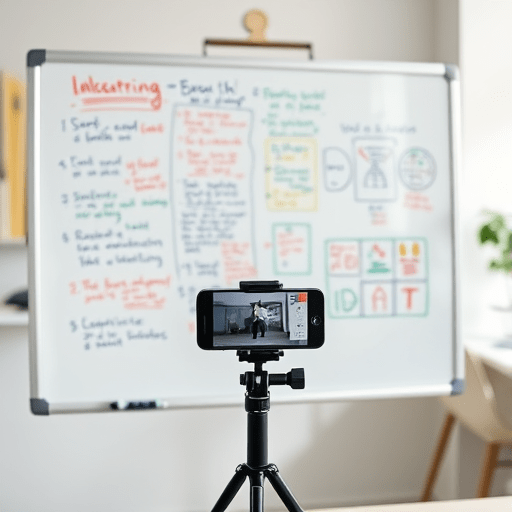
- Mount your phone on a small tripod or a flexible holder attached to the top of the whiteboard frame. This keeps the camera parallel to the board and eliminates perspective distortion.
- Use the rear camera, not the front-facing one. Activate gridlines to help you frame the board edges evenly.
- If your phone has a built-in document scanner mode, use it—it will automatically crop and flatten the image. Otherwise, take a plain photo and fix perspective with a photo app.
Building a Photo-Sharing Ritual That Works Across Time Zones
Taking a good photo is only half the story. To turn it into a reliable async communication tool, you need a ritual that everyone understands and can follow even when they’re the only person in the office.
Step 1: Snap and Self-Check
Immediately after finishing a diagram, take three photos: one wide shot including the board’s context, one tight shot of the main diagram, and one close-up of any fine-print annotations. Review the photos on your phone before moving on. If you can’t read every label, rewrite it with a thicker marker and retake.
Step 2: Add a Short Audio or Text Intro
Don’t post the photo alone. Record a short voice memo (30 to 60 seconds) explaining the problem you were trying to solve, the main idea, and any areas where you’re uncertain. If voice memos feel awkward, write a two-sentence summary in your project channel. This context is crucial for teammates who will open the image hours later.
Step 3: Upload to a Designated Async Home
Decide on a single place for whiteboard photos—a dedicated Slack channel, a Notion database, a shared folder, or a project management attachment field. The key is consistency. If your team regularly uses several tools, link the photo from one central location rather than scattering it across multiple threads. This is where your photo-sharing ritual becomes a discipline, not just a one-off habit.
Step 4: Tag and Announce
Use @mentions only for people who need to review the diagram immediately. For everyone else, rely on notification settings triggered by the channel. Add a short description with relevant topic tags so the image is discoverable later. For example: “Customer onboarding flow — v2 after feedback session #async-design #customer-journey”.
Naming and Organizing Whiteboard Photos for Async Search
A photo without context is a memory you’ll never recover. If your whiteboard ritual is going to last, you need a lightweight file-naming convention that doesn’t feel like bureaucracy.
- Use a pattern like
YYYY-MM-DD_topic_initials— for example,2026-03-11_onboarding-flow_AK. - Add a version number if you foresee iterative sketches:
2026-03-11_onboarding-flow_AK_v3. - Store whiteboard photos in a folder that mirrors your project structure, not in a generic “Whiteboards” dump. This makes it easier to find related diagrams alongside other project assets.
- Consider using a photo app or a service with built-in OCR. Many modern tools can extract handwritten text from images, which will make your diagrams searchable by keyword without extra manual labor.
If you’re using a platform like Notion or Coda, you can attach the photo directly to a meeting note or an engineering design doc. That way, the whiteboard image becomes part of a living record rather than a disconnected file.
Making the Whiteboard Photo a Living Document
The ritual doesn’t end when you upload the photo. For the diagram to truly contribute to async collaboration, it needs to invite feedback and evolution. The most effective teams treat the whiteboard photo as the starting point for a conversation, not as a finished artifact.
Encourage Visible Annotations
Ask teammates to use a digital drawing tool to mark up the photo directly. They can add question marks, red circles, or their own sketches over the original image. This preserves the handwritten feel while allowing remote colleagues to contribute asynchronously.
Version Your Physical Sketches
When someone in the office returns to the same whiteboard, take a new photo and save it as the next version. Don’t erase the previous diagram until you’ve archived its image and linked it in the same thread. This creates a visual history of how the concept evolved—something a purely digital whiteboard often loses in a pile of undo actions.
Convert When It’s Time to Build
Eventually, a hand-drawn diagram will need to become a polished specification. Use the photo as a reference to recreate the diagram in a digital tool like FigJam, Miro, or a simple SVG editor. Add a link from the original photo to the digital version so future readers can see the chain from sketch to implementation.
Common Pitfalls and How to Avoid Them
Even with the best intentions, the photo-sharing ritual can break down. Here are the most frequent failure modes and quick fixes.
- The unreadable photo. You did not do the self-check. Fix it by making a rule: always zoom in on the phone screen before leaving the board.
- The orphaned image. A photo posted with no summary or context quickly becomes ignored. Fix it by treating the audio memo or written caption as part of the delivery—not an optional extra.
- The whiteboard graveyard. If every photo is saved to the same place with no naming convention, you’ll eventually stop looking. Fix it by spending ten minutes once to set up a folder structure and enforce the naming pattern.
- The async delay. If you post a whiteboard photo and then immediately schedule a live meeting to discuss it, you’ve broken the async promise. Fix it by waiting at least one full workday before discussing, allowing global teammates to process and comment.
Conclusion
Using a physical whiteboard in a remote async team is not a nostalgic throwback—it’s a deliberate strategy to bring embodied thinking back into distributed collaboration. The photo-sharing ritual for hand-drawn diagrams doesn’t require fancy equipment or heavy process. It only asks for a consistent station, a clear capture routine, and a shared understanding of how photos should be stored and discussed. When done well, it gives your team the best of both worlds: the spontaneity of a marker on a board and the durability of an asynchronous digital archive.