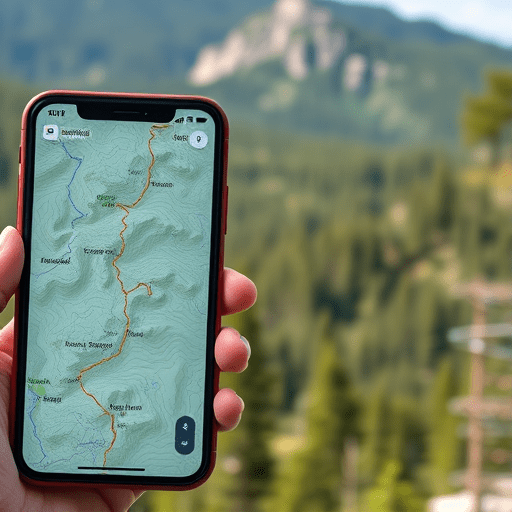
If you love exploring backcountry trails but worry about battery drains and navigation mistakes, you’re not alone. The 7 Low‑Cost GPS Tricks to Keep You on the Trail in Backcountry Hikes strategy focuses on free or inexpensive tools, smart device settings, and simple accessories that let you navigate confidently without emptying your pack. Below you’ll find practical, budget‑friendly tactics that work in any wilderness setting.
1. Download Offline Trail Maps from Free Sources
One of the most reliable ways to stay on course is to have a map you can consult without a data connection. Many top hiking apps provide high‑resolution topographic maps that can be downloaded for free.
Key Steps
- Open an app such as Maps.me, OsmAnd, or the free tier of Gaia GPS.
- Search the trail or national park you’ll visit.
- Use the “Download” or “Cache” feature to save the map offline.
- Check the map’s layer options and enable Terrain and Elevation for better situational awareness.
- Verify that the map includes trail markers, water sources, and landmarks.
These maps are usually up to date and free, so you can replace any paid subscription you may have had previously.
2. Turn on Low‑Power Settings and Disable Unnecessary Features
Every second of battery life counts on a long hike. Most smartphones allow you to cut power usage drastically while still keeping GPS functional.
Tips for Maximizing Battery Life
- Activate Battery Saver or Low‑Power Mode.
- Switch your screen to auto‑lock after 1–2 minutes.
- Turn off Wi‑Fi, Bluetooth, and mobile data unless needed for a specific feature.
- Disable push notifications for non‑essential apps.
- Use the phone’s “Do Not Disturb” mode to avoid accidental screen wakes.
- Enable Airplane Mode and then manually toggle the GPS toggle on.
By isolating the GPS signal, you maintain a low‑power profile that can extend your device’s operating time by 30–50%.
3. Repurpose an Old Smartphone or Tablet as a Dedicated GPS
Instead of carrying a pricey GPS device, consider turning a second‑hand phone into a dedicated navigation tool.
Why It Works
- Phones have built‑in high‑quality GPS chips.
- Free mapping apps are abundant and often cheaper than specialized hardware.
- Repurposing reduces pack weight and eliminates the need for extra charging cables.
Set It Up
- Clear the phone of personal data and factory reset it.
- Install a single, reliable offline map app.
- Configure the phone to use the low‑power settings described above.
- Charge it fully before heading out and keep a spare power bank.
This approach gives you a cheap, lightweight “GPS” that can run for days on a single charge.
4. Leverage Free GPS Overlay Apps for Real‑Time Tracking
Overlay apps let you view your GPS track over satellite imagery or topographic maps without a subscription. They’re especially handy if you’re planning to leave a trail or want real‑time position sharing with a partner.
Popular Free Options
- OsmAnd offers a free “Track” mode that records your path.
- OpenStreetMap’s GPS Tracking feature is entirely open source.
- GPX Viewer on Android allows you to load GPX files and view them on offline maps.
These tools can overlay your current position on a map that includes contour lines and trails, helping you avoid getting lost.
5. Bundle a Small Solar Panel or Portable Power Bank
While you’re already looking for low‑cost solutions, a lightweight solar charger or a high‑capacity power bank can be a game‑changer, especially on sunny days.
Choosing the Right Solar Panel
- Look for panels rated around 10–15W; they are lightweight yet effective.
- Check for integrated charge controllers that prevent over‑charging.
- Consider foldable or attachable designs that fit on a backpack.
Using a Power Bank Efficiently
- Pre‑charge the bank fully before you depart.
- Use it only when you need to top up the phone’s battery; avoid leaving it plugged in for long periods.
- If possible, pair it with a solar panel to keep it topped off.
These accessories can add only a few extra pounds to your pack while dramatically increasing your GPS uptime.
6. Keep Your Route Updated via Trail Apps and Community Feedback
Trail conditions can change with weather or maintenance. Staying connected to a community of hikers ensures you have the latest updates.
Best Practices
- Use apps like AllTrails or TrailLink to view recent user reports.
- Upload a brief GPS track after your hike to provide feedback for future hikers.
- Cross‑reference the trail conditions posted on official park or ranger websites.
- Bookmark alternate routes in case your primary path becomes impassable.
By staying in the loop, you can preempt obstacles and adjust your plan on the fly.
7. Have a Simple Paper Trail Map as a Backup
Technology can fail, especially in extreme environments. A lightweight paper map or printed trail schematic offers a reliable safety net.
How to Prepare
- Print a topographic map or trail schematic at a 1:50,000 or 1:25,000 scale.
- Use waterproof paper or laminate the printout.
- Mark your intended route, water sources, and emergency shelters.
- Carry a small pencil or pen for quick notes.
Even a single sheet can be lifesaving if your GPS battery dies or signal is lost.
Conclusion
By downloading offline maps, optimizing device settings, repurposing old gear, leveraging free overlay apps, adding inexpensive power solutions, staying connected to trail communities, and keeping a paper backup, you can confidently navigate backcountry hikes without breaking the bank. These low‑cost GPS tricks empower you to stay on track, extend battery life, and focus on the experience rather than the gear.